
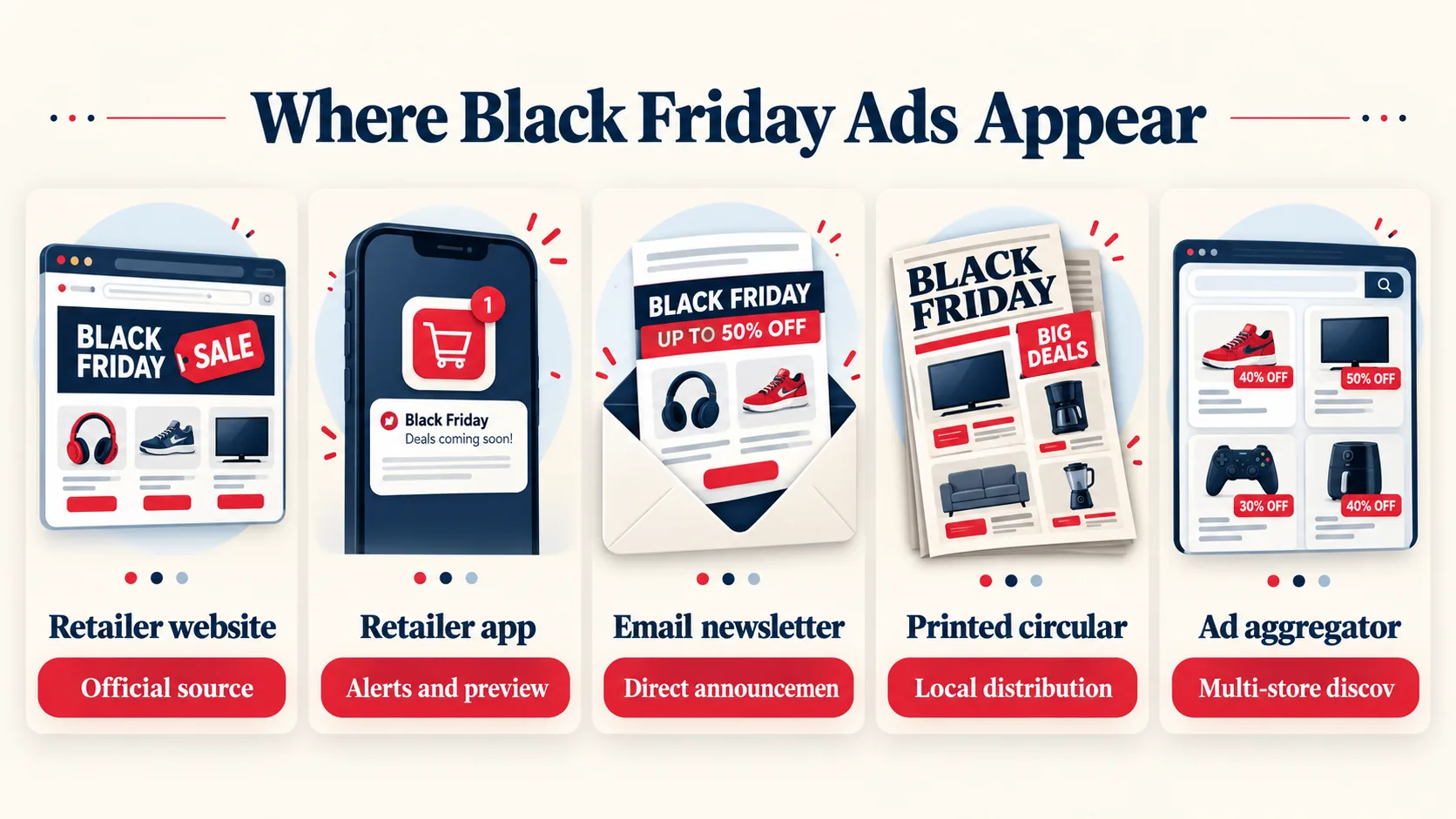
Key takeaway: Black Friday ads appear on retailer websites, shopping apps, email lists, store circular pages, and deal-tracking sites.
Many retailers publish previews before the Friday after Thanksgiving, while others reveal offers in stages.
Check official channels first, then compare listings and confirm availability, pickup rules, and exclusions.
Black Friday ads are no longer limited to printed newspaper inserts. Retailers release them through websites, apps, email campaigns, loyalty accounts, social channels, and store pages.
Some publish a complete circular, while others reveal selected promotions over several weeks.
Knowing where to look helps shoppers find official information before popular products sell out or store inventory changes.
The timing and format of an ad can differ by retailer and product category. Electronics may appear in an early preview, while grocery, home, clothing, or local store offers arrive later.
A reliable search routine separates official advertisements from copied listings, expired promotions, and misleading claims.
It also makes it easier to compare pickup, shipping, membership, and return conditions.
Retailer Websites Reveal Official Ads
The retailer’s website is usually the first place to check for an official Black Friday advertisement. Look for links labeled Black Friday, Holiday Savings, Weekly Ad, Deals, or Catalog.
Large retailers may place the ad on a seasonal landing page instead of the normal weekly circular.
Search the retailer’s site for the product name and promotion terms when the main banner is difficult to find.
A web ad can appear as a searchable product grid, downloadable circular, interactive catalog, or collection of individual product pages. Each format provides different information.
A catalog may show the advertised offer but not current stock. A product page may show pickup options, shipping limits, qualifying memberships, or exclusions.
Read the product page before treating a catalog listing as available everywhere.
Retailer websites also help identify whether an advertisement is national or local. Store selection, delivery area, inventory, and eligible services can change by location.
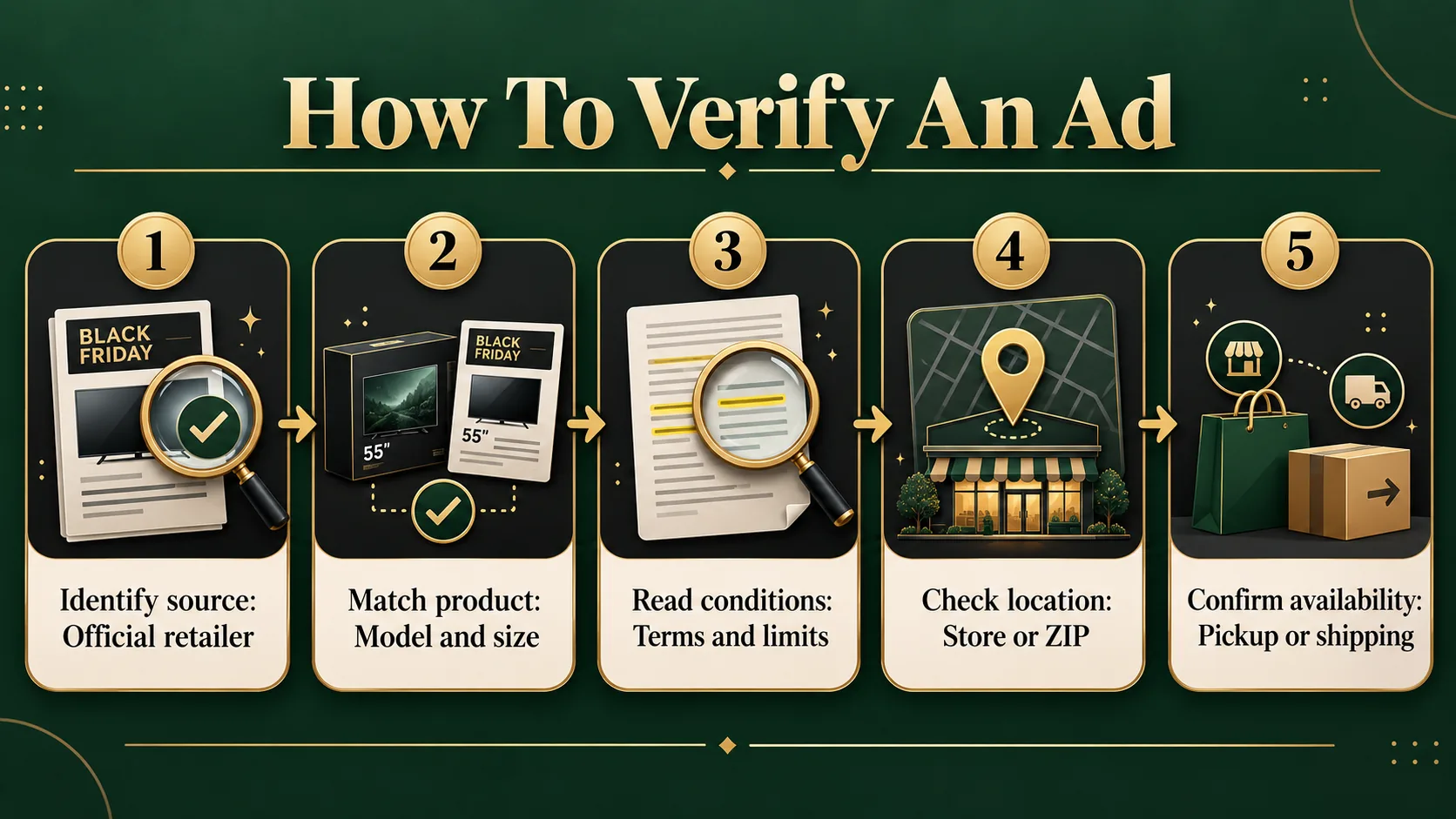
Enter a ZIP code or choose a preferred store when the site requests one. Then record the offer’s start and end period, purchase limits, and any requirement to use a retailer account or app.
Start with official websites before using search results from third parties. Search engines can surface old circulars, affiliate pages, and pages that use retailer names without current authorization.
A current retailer page should connect the advertised item to a product listing, store policy, or promotional terms. Save the page or screenshot the details if the offer may change before checkout.
If you want the full background, read our Black Friday explainer.
The FTC provides consumer buying guidance for evaluating advertising and shopping claims.
Apps And Emails Show Early Previews
Retailer apps often reveal Black Friday information before a full public circular appears. Install the official app, sign in if required, and enable notifications for holiday promotions.
App users may see early access, digital coupons, saved lists, or store-specific inventory. These features can help locate an ad, but they may also require a loyalty account or paid membership.
Email newsletters are another common source of ad previews. Retailers use them to announce event pages, selected deals, member offers, and reminders when a promotion begins.
Subscribe through the retailer’s official website rather than an unfamiliar form.
Use a separate shopping inbox if needed, because seasonal email campaigns can become frequent and may include personalized offers.
An app or email message is not always the complete advertisement. It may highlight only a few products and direct shoppers to a larger circular or event page.
Open the linked terms and check whether the promotion applies in stores, online, or both. Note whether the message describes an advertised price, a coupon, a rebate, or a conditional benefit.
Notifications can also arrive after an advertised item has limited stock. Treat an alert as a prompt to verify details, not as a guarantee of availability.
Open the product page, choose the correct store, and review pickup or shipping status. Turn off promotional notifications after the shopping season if the account no longer needs them.
NIST explains online security basics that help protect accounts used for retailer alerts.
Circular Sites Collect Retailer Listings
Circular websites and deal aggregators collect advertisements from many retailers in one place.
They can save time when shoppers want to compare categories, identify early previews, or check several nearby stores.
Their listings may include scanned pages, typed summaries, product links, and start or end information. Use them as discovery tools, then verify important details on the retailer’s own channel.
A third-party listing can remain visible after an offer ends or after a retailer changes its terms. It may also omit local restrictions, membership requirements, purchase limits, or stock information.
Check the publication label and follow the source link when one is provided. If the source cannot be identified, treat the listing as a lead rather than confirmation.
Search filters can make circular sites more useful. Select the retailer, category, store area, and advertisement type before reviewing results.
Compare the product model number, size, color, included accessories, and condition. Similar product names can hide meaningful differences.
A shortened listing may describe a bundle or special configuration that is not the same as the regular product.
Use several sources when a promotion matters, but avoid copying a deal title without checking its origin. Official pages are the best reference for fulfillment and returns.
Circular sites are better for broad discovery and comparison.
This division of roles reduces confusion and helps shoppers distinguish a retailer’s own advertisement from commentary written by another publisher.
CISA offers phishing awareness advice for spotting suspicious links in promotional messages.
Local Ads Need Store Verification
Local Black Friday ads can differ from national advertisements because stores have different inventory, management, services, and regional promotions.
Grocery chains, department stores, warehouse clubs, and independent retailers may publish location-specific pages. A national event page may not list every local offer.
Check the store selector, local circular, or store social account for information tied to the chosen location.
Newspaper inserts and printed circulars still matter in some areas, especially for grocery, pharmacy, hardware, and regional retailers.
They can show local products, opening hours, and store-only promotions. However, printed material may be distributed before last-minute changes.
Compare it with the retailer’s current website or call the store when a product or service is especially important.
Store hours and access rules can change independently from the advertised products.
A retailer may use special opening hours, appointment systems, curbside limits, or separate rules for a warehouse, outlet, or mall location. Check the location page before traveling.
Verify whether the ad applies at that store and whether the item is available for pickup or only for delivery.
Local verification is especially important for advertisements that mention limited quantities or doorbuster-style availability.
An ad can describe a valid promotion without promising that every store will have stock. Avoid relying on unofficial social posts or comments as inventory confirmation.
Use the retailer’s stock indicator, customer service channel, or store contact information for the latest local guidance.
The USPS site provides mail delivery information for shoppers expecting printed circulars.
Spot Authentic Ads And Terms
An authentic Black Friday ad normally identifies the retailer, promotion period, product details, and conditions. It may include a circular page, official URL, product number, or link to terms.
Missing retailer information, altered logos, vague product descriptions, and requests for unusual payment methods are warning signs.
Do not use a suspicious page to access an account or submit personal information.
Check whether the advertised offer is a sale, coupon, rebate, gift card incentive, bundle, or membership benefit. These structures can have different requirements and timing.
A coupon may need activation, while a rebate may require a later submission. A bundle may include a separate item with limited choices.
Understanding the format prevents an attractive headline from being mistaken for an immediate discount.
Read exclusions before comparing advertisements. Common limits can cover brands, colors, models, services, delivery areas, quantities, or marketplace sellers.
Some offers apply only during a stated event window, while others continue until stock is depleted.
The product page and promotion terms should answer whether the offer works online, in stores, through an app, or with a loyalty account.
Keep a short record of the source, product identifier, conditions, and intended store. Recheck the information before placing an order because retailers can update inventory and fulfillment details.
If a page conflicts with a current checkout total, current terms and the retailer’s customer service channel carry more weight than an old image or reposted circular.
Questions buyers ask
When do Black Friday ads come out?
Retailers release Black Friday ads at different times. Some publish previews weeks before the Friday after Thanksgiving, while others reveal offers in stages or wait until the shopping event begins.
Check official websites, apps, email lists, and circular pages regularly. A preview can change before final terms, inventory, or participating stores are confirmed.
Where can I find Black Friday ads online?
Look on the retailer’s official website, mobile app, email newsletter, loyalty account, and weekly ad page.
Circular aggregators can help compare many retailers, but they should not replace official verification.
Open the product page and promotion terms to confirm availability, conditions, fulfillment options, and whether the advertisement applies to your chosen store.
Are Black Friday ads available in newspapers?
Some retailers still distribute printed circulars through newspapers, mailers, or store entrances. Printed ads can be useful for local grocery, pharmacy, hardware, and regional offers.
They may not reflect later changes, though. Compare the paper circular with the retailer’s current website and check local hours, stock information, exclusions, and purchase limits.
How can I get Black Friday ad alerts?
Subscribe to official retailer emails, install the retailer’s app, and enable notifications for holiday promotions.
You can also follow reputable circular services or create search alerts for specific products.
Verify every alert through the retailer’s website because notifications may show previews, member-only terms, limited inventory, or links to offers that have already changed.
Do all stores release Black Friday ads?
No. Some retailers publish a complete circular, while others use product pages, email announcements, app previews, or short promotional events.
Smaller and local stores may advertise through social channels or printed materials instead.
If no ad appears, check the retailer’s weekly ad, holiday landing page, local store page, and customer service information.
Why can’t I find a retailer’s Black Friday ad?
The retailer may not have released its advertisement yet, or it may use a seasonal page instead of a traditional circular.
Search the retailer’s site for holiday savings, weekly ad, catalog, or Black Friday. Also check the official app and email list.
A regional store may publish its own information separately from the national website.
Can I trust Black Friday ad leaks?
Treat leaked ads as unconfirmed until the retailer publishes matching information. Images can be outdated, edited, incomplete, or limited to selected stores.
Compare product numbers, promotion terms, event timing, and fulfillment rules with an official source.
Avoid entering account credentials or payment details on pages that only claim to host a leaked circular.
How do I compare Black Friday ads?
Compare the exact model, size, configuration, included accessories, seller, and condition first.
Then review the offer type, membership requirement, purchase limit, fulfillment method, return policy, and local availability.
Use third-party circular sites for broad discovery, but confirm the final terms and current stock on each retailer’s official product page.
Do Black Friday ads show store inventory?
An advertisement usually describes the offer, not guaranteed inventory at every location. Current stock may appear on the retailer’s product page after you select a store or ZIP code.
Inventory can change quickly, especially for limited-quantity products. Check pickup or delivery status immediately before ordering and confirm any store-specific restrictions.
More Black Friday and Cyber Monday guides
Planning the rest of your Black Friday? These cover the same shopping window:

